
Voice Creator Pro is the Rask AI alternative that dubs every speaker in their own voice from $5 a month
Every speaker cloned automatically, lip sync you switch on or off, and video, audio-only, or subtitle exports, watermark-free from $5 a month or one-time on desktop.
Updated September 2026
Rask AI translates a video and re-voices it in the original speaker's voice, with transcript editing and SRT files along the way. People leave over the bill: every translated minute counts once per language, lip sync starts on the $99 Creator Pro plan, and Enhanced lip sync uses three minutes of allowance per video minute.
Quick Picks
- Voice Creator Pro: best for multi-speaker dubbing with every voice cloned, plus subtitle and audio-only exports
- HeyGen: best for avatar video plus translation in one tool
- ElevenLabs Dubbing: best for voice quality and a large voice ecosystem
- CAMB.AI: best for broadcast, sports, and live-stream dubbing
- Maestra: best for subtitles, transcription, and dubbing under one roof
- Dubverse: best for Indian-language localization on a small budget
- Rask AI: still a strong pick for wide language reach with voice cloning into 32 languages
Quick Comparison
| Tool | How it meters | Lip sync | Voice cloning | Paid from (Sept 2026) |
|---|---|---|---|---|
| Rask AI | Minutes per output language | Creator Pro ($99) and up | 32 languages | $39/mo for 25 min |
| Voice Creator Pro | Monthly tokens; desktop unlimited | Optional in the pipeline | Every speaker, automatic | $5/mo; $54.99 desktop once |
| HeyGen | 4 to 10 credits per minute | Speed or Precision mode | $29/mo ($24 annual) | |
| ElevenLabs | Credits per dubbed minute | Verify on their site | Every speaker, automatic | $6/mo |
| CAMB.AI | Monthly credits | Verify on their site | From a short clip | $5/mo |
| Maestra | Voiceover minutes per month | $2/min add-on from Business | Premium plan and up | $39/mo (annual) |
| Dubverse | About 4 credits per dubbed minute | Enterprise only | Supreme plan and up | $18/mo |
Rask AI: Best for Wide Language Reach With Voice Cloning
Rask AI is a video and audio localization platform: it transcribes, translates, re-voices in a clone of the speaker's voice, and optionally lip-syncs the result.
- Best for: teams that need many target languages, voice cloning across 32 of them, and a shared workspace with review steps
- Price: free trial (3 minutes); Creator $39/mo (25 minutes); Creator Pro $99/mo (100 minutes); Business $249/mo (250 minutes); annual plans from $329 a year (plan cards, September 2026)
- Standout: translation into 135+ languages, with speaker voice cloning into 32 of them, a broader cloning list than most tools here
- Limitation: lip sync is absent from Creator, every minute is counted once per output language, and it runs in the cloud only
Pros
- Multi-speaker lip sync on Creator Pro and above, with a Standard model and an Enhanced model
- Script control: transcript, timestamp, speaker label, and voice setting edits, a built-in editor for per-line fixes, translation prompting, and a glossary so brand terms translate consistently
- Team and enterprise features: workspaces of up to 3 members on Creator Pro and 5 plus guest reviewers on Business, reviewer roles and approval, SOC 2 Type II and GDPR compliance, API access, and an Enterprise tier with SLAs
Cons
- One Rask minute equals one minute of final translated output, so a 5-minute video into 2 languages uses 10 minutes (Rask's own example)
- Enhanced lip sync charges 3 minutes per minute of video on top of the translation (Rask labels that pricing beta and says it may change)
- Monthly plans lose unused minutes at the end of each billing cycle, and canceling removes whatever minutes remain; only annual plans roll minutes over, for as long as the subscription is active
Why people look for alternatives: the meter. Creator's 25 minutes a month covers a single 10-minute video into two languages and very little else. Subtitles come burned in or as SRT, and the pricing page does not state whether background music and sound are kept or whether the dubbed audio can be exported on its own.
Budgeting is also harder than it should be. As of September 2026 the pricing page shows two sets of numbers at once: plan cards at $39, $99, and $249, and an FAQ still listing $60, $150, and $750, under a banner saying prices are changing soon.
Voice Creator Pro: Best for Multi-Speaker Dubbing in Each Speaker's Own Voice
Voice Creator Pro attacks the meter: every speaker is cloned automatically, lip sync is a switch inside the same job, and the desktop app has no minute count at all.
- Best for: creators and small teams dubbing multi-speaker video who want every speaker to keep their own voice, without a per-language minute count deciding how many languages they can afford
- Price: Cloud free tier with dubbing included (5,000 tokens a month, exports watermarked, files kept 30 days); Starter $5/mo removes the watermark (250,000 tokens); Premium $20/mo (1,500,000 tokens); desktop app one-time from $54.99 with unlimited generations, running the whole pipeline on your own machine and offline. Commercial rights on every tier.
- Standout: each speaker separated and cloned from the source audio, with lip sync as an optional stage you turn on or off
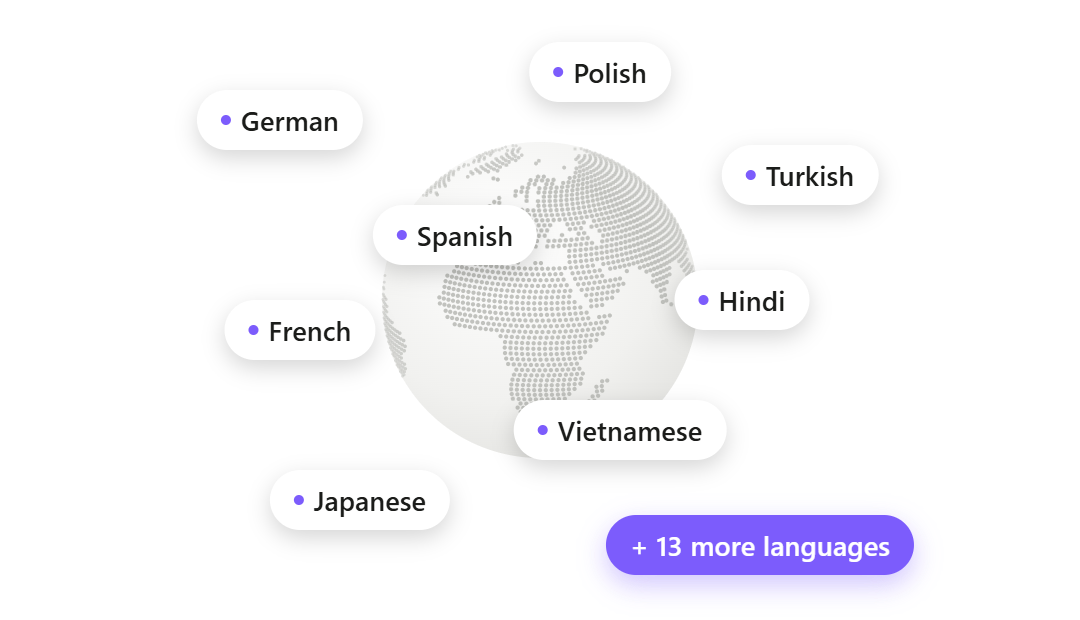
- Limitation: 21 dubbing languages (English included) against Rask's 135+, and no shared team workspace
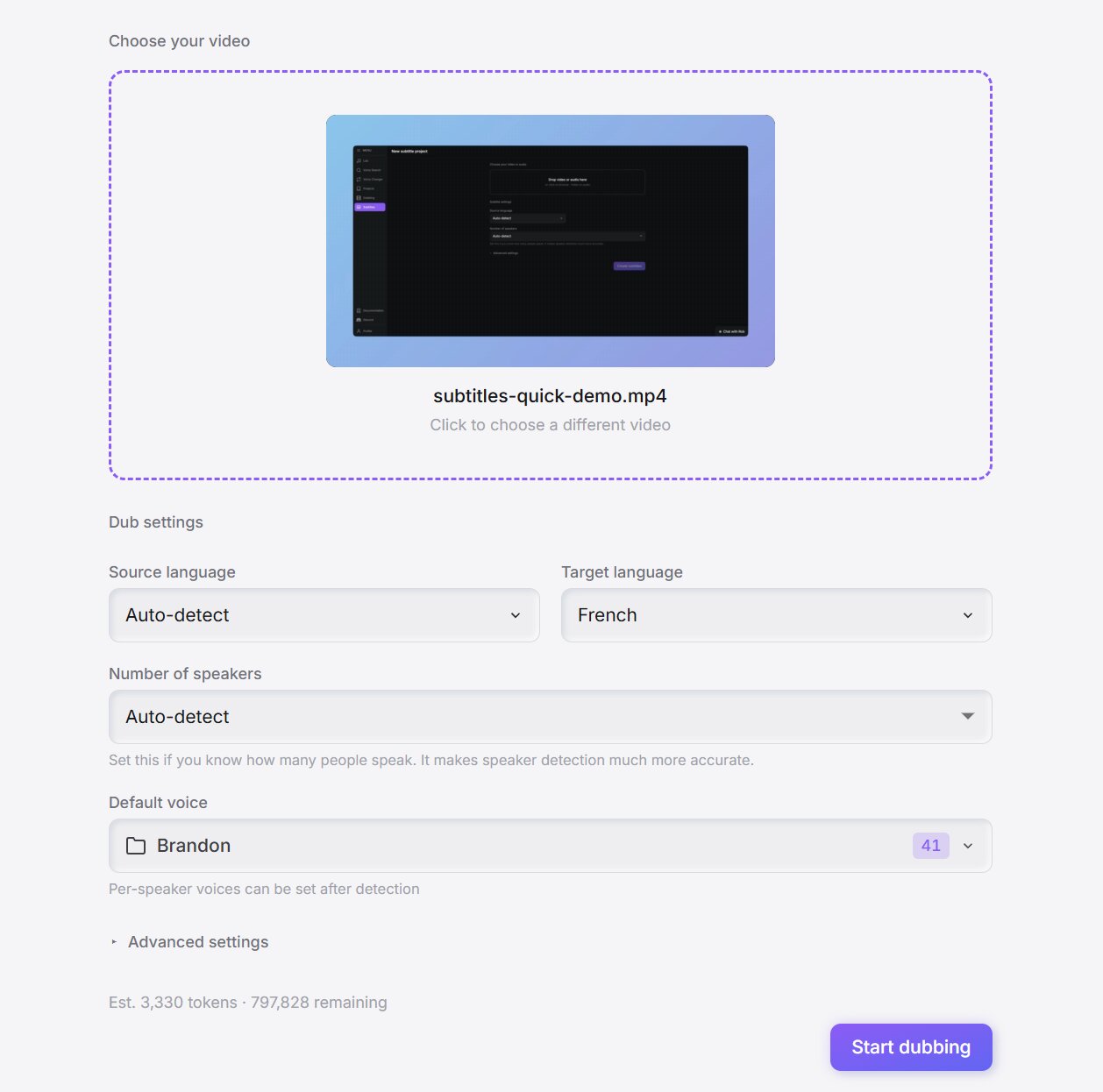
How a dub runs. The Video Dubbing workflow will feel familiar to a Rask user, in six stages: transcribe and translate, separate speakers, clone and re-voice, lip sync (optional), subtitles, and export. A two-host podcast comes back with both hosts sounding like themselves in the new language.
Lip sync only when you need it. Plenty of content (screen recordings, slide-based courses, voiceover explainers, audio tracks for YouTube) never needed lip sync, and there is no reason to buy a bigger plan to reach it when you do.
Pros
- Speakers on your terms: let the pipeline work out the speaker count or set it yourself, then override any speaker with a designed or library voice, or switch automatic cloning off and pick every voice by hand
- Script and timing: the transcript and translation are editable before the dub, translated lines are sped up or slowed down automatically to fit the original timing, the original background music and sound effects stay under the new dialogue, and any single segment can be regenerated without re-running the video
- Four kinds of export: the finished video with the new audio, lip sync, and styled subtitles baked in (caption or karaoke-style highlighting, background boxes, fonts, saved presets); the dubbed audio alone, for an extra language track on YouTube; SRT or VTT files; or a transparent subtitle overlay (.mov or .webm)
Cons
- 21 dubbing languages; if your target market sits outside them, Rask, HeyGen, CAMB.AI, or Maestra fits better
- No shared team workspace or reviewer approval flow
- Its REST API runs locally on the desktop app, so it is the wrong choice if you need a hosted dubbing API
The same account includes text to speech with 13 emotions, zero-shot voice cloning from a 3 to 10 second clip, voice design, speech to text, a voice changer, and a Clips Generator that cuts long videos into short vertical clips you can dub.
The standalone subtitle generator (compared in our best subtitle generators roundup) translates captions into the same 21 languages and exports burned-in video, SRT/WebVTT, an After Effects .jsx, or transparent Animation .mov, ProRes .mov, or WebM.
Try Video Dubbing free in your browser, or follow our guide on how to dub a video into another language for a step-by-step walkthrough.
Upload one multi-speaker video and hear every speaker in their own voice in a new language
Dub a video freeHeyGen: Best for Avatar Video Plus Translation
HeyGen is an AI avatar video platform whose translator re-voices a speaker in 175+ languages and dialects using voice cloning, with lip sync and a proofreading step before you finalize.
- Best for: marketers and educators who already make avatar videos and want translation in the same tool
- Price: Free (3 videos a month, watermarked); Creator $29/mo ($24 annual) with 600 credits; Pro $49/mo ($39 annual) with 1,000 credits; Business $149/mo ($119 annual) plus $20 per seat with 1,500 credits (September 2026)
- Standout: lip sync from the $29 Creator plan, in Speed or Precision mode
- Limitation: credits are shared with HeyGen's avatar and video generation features
Pros
- Lip sync is far easier to reach on published numbers: $29 Creator, where Rask requires $99 Creator Pro
- 175+ languages and dialects, against Rask's 135+
Cons
- Per HeyGen's help center, translation costs 4 credits a minute without lip sync, 6 in Speed mode, and 10 in Precision mode
- The core product is avatars; translation is one feature among many, and its script controls are built around a presenter speaking to camera
- Videos are capped at 30 minutes on Creator and Pro and 60 on Business, and the free plan's translation limits differ between its pricing page and its translation page, so test before committing
How it compares to Rask AI: a 10-minute video into 3 languages with Speed lip sync would use 180 of Creator's 600 monthly credits. The trade is that a heavy avatar user shares one pool across everything. Our HeyGen alternatives comparison covers the avatar side in more depth.
ElevenLabs Dubbing: Best for Voice Quality and a Large Voice Ecosystem
ElevenLabs advertises dubbing into 90+ languages and accents, delivering each translation in an automatic clone of the original speaker, with a Dubbing Studio for line-by-line edits.
- Best for: people who already use ElevenLabs for voiceover and want dubbing in the same account
- Price: Free (10,000 credits a month), Starter $6/mo (30,000 credits), Pro $99/mo (600,000 credits), with more tiers in between and above (September 2026)
- Standout: it leads on raw voice quality and on its wider voice tools
- Limitation: dubbing shares one credit pool with text to speech, sound effects, and everything else in the account
Pros
- You choose what each minute costs: its pricing FAQ lists 2,000 credits a minute (automatic, with watermark), 3,000 (automatic, no watermark), 5,000 (Dubbing Studio, with watermark), or 10,000 (Dubbing Studio, no watermark)
- A free plan to test on
Cons
- At 3,000 credits a minute, Starter covers about 10 minutes of watermark-free automatic dubbing, well under Rask Creator's 25
- Editing in Dubbing Studio costs more than automatic dubbing
- ElevenLabs is rolling out a newer dubbing model with its own allowances, so check the dubbing page for current figures
How it compares to Rask AI: both meter per minute, but ElevenLabs lets you pick the price of each minute through the mode and the watermark. Our ElevenLabs dubbing alternatives comparison breaks down the credit math further.
CAMB.AI: Best for Broadcast, Sports, and Live Dubbing
CAMB.AI offers on-demand dubbing through its DubStudio and real-time dubbing for live streams and broadcasts, which it has used for multi-speaker sports commentary.
- Best for: broadcasters, sports media, and anyone who needs live dubbing as well as on-demand
- Price: Free (5,000 credits, one-time), Essentials $5/mo (10,000 credits), Pro $20/mo (42,000 credits), Premier $75/mo (165,000 credits), Advanced $250/mo (575,000 credits), and Enterprise (September 2026)
- Standout: 150+ languages and voice cloning from a very short reference clip
- Limitation: the pricing page does not state how many credits a dubbed minute uses
Pros
- More languages than Rask, plus live content, which sits outside Rask's advertised plans
- A far lower self-serve entry price
Cons
- Credits are shared across CAMB.AI's audio tools, so run a test video before choosing a plan
- Strongest fit for media and broadcast workflows; creators may find the product broader than they need
- Verify lip sync availability and plan gating on CAMB.AI's own site
How it compares to Rask AI: Rask at least publishes a minute count per plan, while CAMB.AI's credit-to-minute conversion is something you discover by using it.
Maestra: Best for Subtitles, Transcription, and Dubbing Under One Roof
Maestra advertises AI dubbing in 125+ languages, with speaker identification so each speaker gets their own dubbed voice, and sells separate transcription, subtitle, and real-time caption plans.
- Best for: teams that need transcription, subtitles, and dubbing from one vendor, with audio-only exports
- Price (billed annually, September 2026): Voiceover Basic $39/mo (120 minutes); Premium $79/mo (300 minutes, or 100 with pro voices and voice cloning); Business $159/mo (600 minutes, or 200 with pro voices and cloning); Business Plus $359/mo; free trial with no credit card
- Standout: exports as MP4, MP3, or WAV, plus TXT, SRT, and VTT for transcripts and subtitles
- Limitation: lip sync needs the $159 Business plan and then costs $2 a minute extra
Pros
- More minutes on the base plan (120 versus Rask Creator's 25)
- Bundles more of a transcription and subtitle workflow than Rask
Cons
- No voice cloning on Basic; cloning minutes are a third of standard voiceover minutes on each plan
- The headline prices are annual; monthly billing costs more
How it compares to Rask AI: Maestra gates lip sync even higher than Rask does, but if your team also needs a transcription and subtitle workflow, Maestra bundles more of it.
Dubverse: Best for Indian-Language Localization on a Budget
Dubverse is a dubbing platform with 200+ AI voices, AI subtitles, and custom voice cloning, with particular emphasis on Indian languages.
- Best for: creators localizing into Indian languages on a tight budget
- Price: Pro $18/mo ($108/year) with 50 credits (about 12.5 minutes of dubbing), videos up to 60 minutes, no watermark; Supreme $30/mo ($180/year) with the same 50 credits plus voice cloning and videos up to 150 minutes; Enterprise adds lip sync and multi-speaker support; 2-day free trial (September 2026)
- Standout: a cheaper entry price than Rask, with a focus on Indian-language voices
- Limitation: lip sync and multi-speaker support require an Enterprise conversation
Pros
- No watermark from the $18 Pro plan
- Videos up to 60 minutes on Pro and 150 on Supreme
Cons
- Fewer minutes than Rask Creator (about 12.5 versus 25), small for anyone dubbing weekly
- Voice cloning needs Supreme
How it compares to Rask AI: Dubverse makes sense when Indian-language voices matter more than keeping the original speaker's voice.
What a Real Dubbing Job Costs on Rask
Rask's per-minute pricing multiplies with languages and lip sync. Take one ordinary job, computed from the plan cards on rask.ai/pricing as of September 2026: a 10-minute video dubbed into Spanish, German, and Japanese.
- Dub only: 30 Rask minutes (10 x 3 languages). Does not fit Creator ($39, 25 minutes); fits Creator Pro ($99, 100 minutes) at 30% of the month.
- Dub plus Standard lip sync: 60 minutes (30 + 30). Not available on Creator; 60% of Creator Pro.
- Dub plus Enhanced lip sync: 120 minutes (30 + 90). Not available on Creator; 20 minutes over Creator Pro.
Now make it weekly. One such video a week is about 120 minutes a month before lip sync, already over Creator Pro's 100. With Standard lip sync it is about 240, just inside Business ($249, 250 minutes). With Enhanced it is about 480, beyond every self-serve plan.
Rask sells extra minutes at $3 each, but its pricing page ties top-ups to annual plans and higher tiers, so on a monthly plan the practical fix is upgrading.
Annual plans soften this (Creator Pro is $799 a year for 1,200 minutes, and unused minutes roll over), and Enhanced lip-sync pricing is marked beta, so it may change in either direction.
The same job on Voice Creator Pro
On the desktop app it costs nothing beyond the one-time purchase from $54.99, whether you dub one video a month or one a day, in one language or all 21. On Cloud, dubbing draws from your monthly tokens, and lip sync is a setting inside that same job.
Token use depends on the length of the video and the options you choose, so try a representative video on the free tier before picking a plan.
Who should stay on Rask?
Anyone who needs a language outside Voice Creator Pro's 21, voice cloning into Rask's specific list of 32, reviewer approval across a team, or a hosted API. For them, Rask's annual plans with rollover are a reasonable deal. Solo creators and small teams dubbing regularly into a handful of major languages are the ones who should look around.
Switching From Rask AI
Switching works best if you time it around your remaining minutes and test on one representative video first.
- Use or download what you have. On monthly plans unused minutes vanish at the end of each cycle, and canceling removes any that remain, so export finished videos and SRT files first.
- Pause instead of canceling if you are unsure. Rask lets you pause a subscription once every 12 months for up to a month, which keeps your minutes while you test.
- Upload one representative video to Video Dubbing on the free tier, pick the target language, and let it detect and clone the speakers.
- Review the transcript and translation, fix product names, and choose whether lip sync is on.
- Export what the next step needs: the video, the dubbed audio alone, or subtitle files. Free exports are watermarked; Starter at $5 a month removes the watermark, or the desktop app is a one-time purchase.
Dub your first video without counting minutes per language
Dub my first video freeHow to Choose
- Pick Voice Creator Pro if you want every speaker cloned and lip sync without a bigger plan.
- Pick the Voice Creator Pro desktop app if you dub often and do not want to watch a minute count; it is a one-time purchase with no limit on dubs.
- Pick Rask AI, HeyGen, CAMB.AI, or Maestra if you need a language outside the major 21; they all advertise 100+ languages.
- Pick HeyGen if you already make avatar videos, since lip-synced translation starts on the $29 plan.
- Pick ElevenLabs Dubbing if you already use ElevenLabs for voiceover and want one credit pool.
- Pick CAMB.AI if you dub live broadcasts or sports.
- Pick Maestra if you need transcription, subtitles, and dubbing from one vendor.
- Pick Dubverse if you localize mainly into Indian languages.
For a ranking of the whole category without a Rask anchor, see our roundup of the best AI dubbing software. Dubbing a course? Our guide on how to dub an online course walks through it lesson by lesson.
Deciding between captions and a full dub? Our explainer on sub vs dub covers the trade-offs, and our guide to adding subtitles and dubbing to YouTube videos covers multi-language audio tracks.
Try Video Dubbing for free
Also available on Windows and macOS. One-time purchase, unlimited generations.