
Keep Every Course Current Without Re-Recording
Update a lesson and regenerate the audio in seconds. Produce every course in multiple languages from a single script.
See It in Action
From Lesson Script to Narrated Audio
Introduction to Trigonometry
Lesson 1
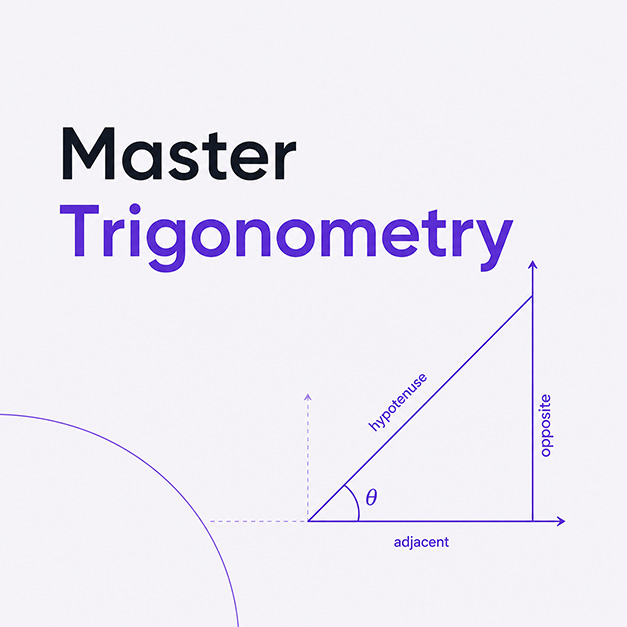
Today we're going to learn one of the most useful tools in all of mathematics: trigonometry. Don't let the name intimidate you. At its core, trigonometry is just the study of triangles, specifically right triangles. And once you understand three simple ratios, you can solve problems that range from measuring the height of a building to navigating a ship across the ocean. Let's start with a right triangle—that's any triangle with one 90-degree angle. The longest side opposite that right angle is called the hypotenuse. The other two sides are named relative to whichever of the remaining angles you're focused on. We'll call that angle theta.
Core Capabilities
Everything You Need to Narrate a Course
When your content changes, your narration changes with it. Export audio ready for your LMS, video editor, or slide deck in any language.
From Script to Narrated Lesson
Paste your lesson content or import from a document. Choose a narrator voice, adjust pacing, and export audio files for each lesson. One tool handles your entire course catalog.
Update Content Without Re-Recording
Curriculum changes are inevitable. When a lesson needs updating, edit the script and regenerate just the affected sections. No narrator to re-book, no studio to schedule. Your narration stays current with your content.
Consistent, Clear Voices for Every Lesson
Students hear the same reliable narrator across your entire curriculum. The AI voice never gets tired, never changes tone between recording sessions, and delivers the same clarity whether it is lesson one or lesson fifty.
Built for Education
Everything You Need to Narrate Courses
Voice Cloning
Narrate courses in your own voice. Record a 3 to 10 second sample and Voice Creator Pro will clone it. Use your cloned voice across all your courses.
600+ Languages
Produce multilingual versions of the same course without hiring additional narrators. Reach global audiences from a single tool.
Pacing Controls
Slow down for complex explanations, add pauses between topics, and adjust speaking rate per section. Optimized for learner comprehension.
Multiple Export Formats
Export to MP3 for LMS platforms, WAV for video editors, or FLAC for archival quality. One lesson per file or entire modules as a single track.
Long-Form Support
No length limits. Import full course scripts or individual lessons and generate audio for everything. A 20-hour course costs the same as a 5-minute lesson.
Privacy First
With the desktop app, everything stays on your hardware. Cloud users benefit from encrypted processing and strict data policies.
Multiple Narrator Voices
Assign different voices to different modules, sections, or speakers. Use one voice for instructions, another for examples, and another for quizzes.
Works With Any LMS
Export MP3 files compatible with Moodle, Canvas, Teachable, Thinkific, and any other platform that accepts standard audio formats.
Curriculum Consistency
Save voice assignments per project. Reuse the same narrator across course updates and new modules so your curriculum always sounds cohesive.
How It Works
Three Steps to Narrated Lessons
Drop Your Lesson Script
Paste your lesson content or import from a document. Organize into sections that match your course structure.
Choose a Narrator Voice
Select a built-in voice, clone your own, or design one from a text description. Use the same voice across your entire curriculum for consistency.
Export Audio
Export each lesson as a separate MP3 or WAV file. Drop into your video editor, LMS, or slide deck. Update any section whenever content changes.
Recording Yourself vs VCP
Keep Courses Current Without Re-Recording
Course content changes constantly. With VCP, updating narration is as fast as editing the script.
Recording Yourself
Hours
per course, plus every update
- Hours of recording for a multi-module course
- Re-record entire sections when content changes
- Voice quality varies across sessions over weeks
- Locked to one language and one instructor
- Hard to scale across an entire course catalog
VCP Cloud
From $0/mo
up to ~500 hrs/mo at $20, ~50 hrs with cloning
- Update narration instantly when content changes
- No mic, no studio, no editing
- Consistent voice across all modules and updates
- Localize into 600+ languages for global learners
- Turn docs and slides into narrated lessons
VCP Desktop
$59.99
one time, unlimited use
- Same speed and quality, fully offline
- Unlimited courses, no usage caps
- Narrate an entire curriculum in one sitting
- Localize into 600+ languages for global learners
- Keep proprietary training material on your device
Who It's For
Built for Anyone Who Teaches
Online Course Creators
Udemy, Skillshare, Teachable, or your own platform. Narrate entire courses without a microphone.
Corporate Trainers
Onboarding, compliance, and skills training. Use the desktop app to keep sensitive content local, or the cloud for quick collaboration.
University & School Educators
Produce accessible lecture recordings, supplementary audio, and multilingual materials at scale.
LMS Content Teams
Rapid narration for large content libraries. Generate audio for client reviews, internal training, or published courseware.
FAQ
Common Questions
Yes. There are no length limits. Import your full course script or individual lesson scripts and generate audio for everything. Start free in the cloud or use the desktop app for unlimited offline generation.
Edit your script and re-generate the affected sections. The cloud version and the desktop app both let you update narration as often as your content changes.
Yes. Voice Creator Pro supports 600+ languages including English, Spanish, French, German, Japanese, Korean, Chinese, Hindi, and many more. You can produce multilingual versions of the same course.
Yes. Save your chosen voice (built-in, cloned, or designed) and reuse it across all projects. Students hear the same familiar narrator throughout your entire curriculum.
Voice Creator Pro exports to MP3, WAV, FLAC, and M4B. MP3 is accepted by virtually all LMS platforms (Moodle, Canvas, Teachable, Thinkific, etc.) and video editors.
Yes. The desktop app processes everything locally, so sensitive training content never leaves your organization's computers. With Voice Creator Pro Cloud, your data is not used for training purposes.
Yes. Assign different voices to different modules, sections, or speakers. Use one voice for instructions, another for examples, and another for quizzes.
AI narration produces clear, consistent, well-paced speech. It is excellent for instructional content where clarity and consistency matter more than dramatic performance. For most educational contexts, students find it natural and easy to follow.
Start Narrating Your Courses Today
Try it free in your browser, or download the desktop app for unlimited offline course narration.