
Voice Creator Pro is the TimeBolt alternative that cuts to your script and finishes the video in one place
AI Cut removes silences, filler words and bad takes in one pass, then adds subtitles, reframes for Shorts and dubs the result, in your browser or on desktop.
Updated October 2026
TimeBolt is a local jump-cut app for long recordings that says it cuts the silence out of an hour of video in 13 seconds. People look elsewhere when they add up the rest: filler words and bad takes cost $0.03 a minute on top of the plan, and captions, framing and posting still happen in another editor.
Quick picks
- TimeBolt: best for local silence removal with exports to almost any editor
- Voice Creator Pro AI Cut: best if you record from a script and want a finished, captioned video from the same tool
- Gling: best for YouTubers who want B-roll and title ideas with the cut
- Descript: best for doing the whole edit by its transcript
- FireCut: best for cutting fillers and repeats inside Premiere Pro or DaVinci Resolve
- Recut: best for silence-only cutting at a lower one-time price
Quick Comparison
| Tool | Filler words | Picks takes using your script | Shorts and dubbing from the same edit | Paid from (Oct 2026) | Runs as |
|---|---|---|---|---|---|
| TimeBolt | $0.03/min add-on | Keeps the last take | $17/mo; $347 once | Desktop app, one-time purchase or subscription | |
| Voice Creator Pro | Included | The best match to your script | Shorts, and dubbing into 21 languages | $5/mo Cloud; $54.99 desktop once | Web app; desktop app, one-time purchase |
| Gling | Included | Not described | Shorts | $20/mo ($10 yearly) | Web app; desktop app, needs subscription |
| Descript | Paid plans | Not described | Shorts, and dubbing on AI credits | $24/mo ($16 yearly) | Web app; desktop app, needs subscription |
| FireCut | Pro plan and up | On the Max plan | Shorts, on Pro | $34/mo ($20 yearly) for fillers | Premiere and Resolve plugin |
| Recut | $129 once or $15/mo | Desktop app, one-time purchase or subscription |
TimeBolt: Best for Local Silence Removal With Wide Editor Exports
TimeBolt is a Mac and Windows app that jump-cuts silence out of long video and podcast recordings on your own machine, with an AI add-on called UMCHECK for filler words, false starts and bad takes.
- Best for: creators who want the video to stay on their computer and the cut to land in Premiere, Final Cut, Resolve or Camtasia
- Price: Free (silence removal only, watermarked, no XML, no saved projects); Pro $17/mo, $97/yr or $347 lifetime; UMCHECK $0.03 per minute of video on top, checked Oct 2026
- Standout: exports to Premiere Pro, DaVinci Resolve, Final Cut Pro (including multicam) and Camtasia, plus MP4 and SRT
- Limitation: filler-word and bad-take removal are pay-per-use, separate from the plan you bought
Pros
- Processes video locally; for UMCHECK, only the extracted audio is sent for transcription, and you can run WhisperX yourself for $0 a minute
- Fine control: retake lookahead from 5 to 50 lines, custom filler phrases, multi-track sync and keyboard editing during playback
- A lifetime license that works on 2 machines, and UMCHECK credits that never expire
Cons
- Two costs to track: the license and the per-minute UMCHECK credits
- Captions come out as an SRT file; styling them, reframing to 9:16 and adding titles happen in your editor
- No browser version, so every machine needs the app installed
Why people look for alternatives: TimeBolt is built to produce a clean cut quickly and hand it to an editor. Creators who post straight to YouTube or Shorts still need a second tool for captions and framing. Creators who rely on filler removal pay for it by the minute, every month.
Voice Creator Pro AI Cut: Best If You Record From a Script
AI Cut in Voice Creator Pro turns a raw talking-head recording into one clean video, removing long silences, filler words, stutters, false starts and bad takes in the same pass.
- Best for: creators who read from a script or teleprompter and want a finished video, captions included, without a second editor
- Price: free Cloud tier (watermarked); paid Cloud plans from $5/mo; desktop app one-time from $54.99, where you connect your own AI model key
- Standout: paste the script you recorded from, and AI Cut finds the take of each line that best matches it
- Limitation: exports Premiere Pro and DaVinci Resolve XML, but no Final Cut Pro or Camtasia files
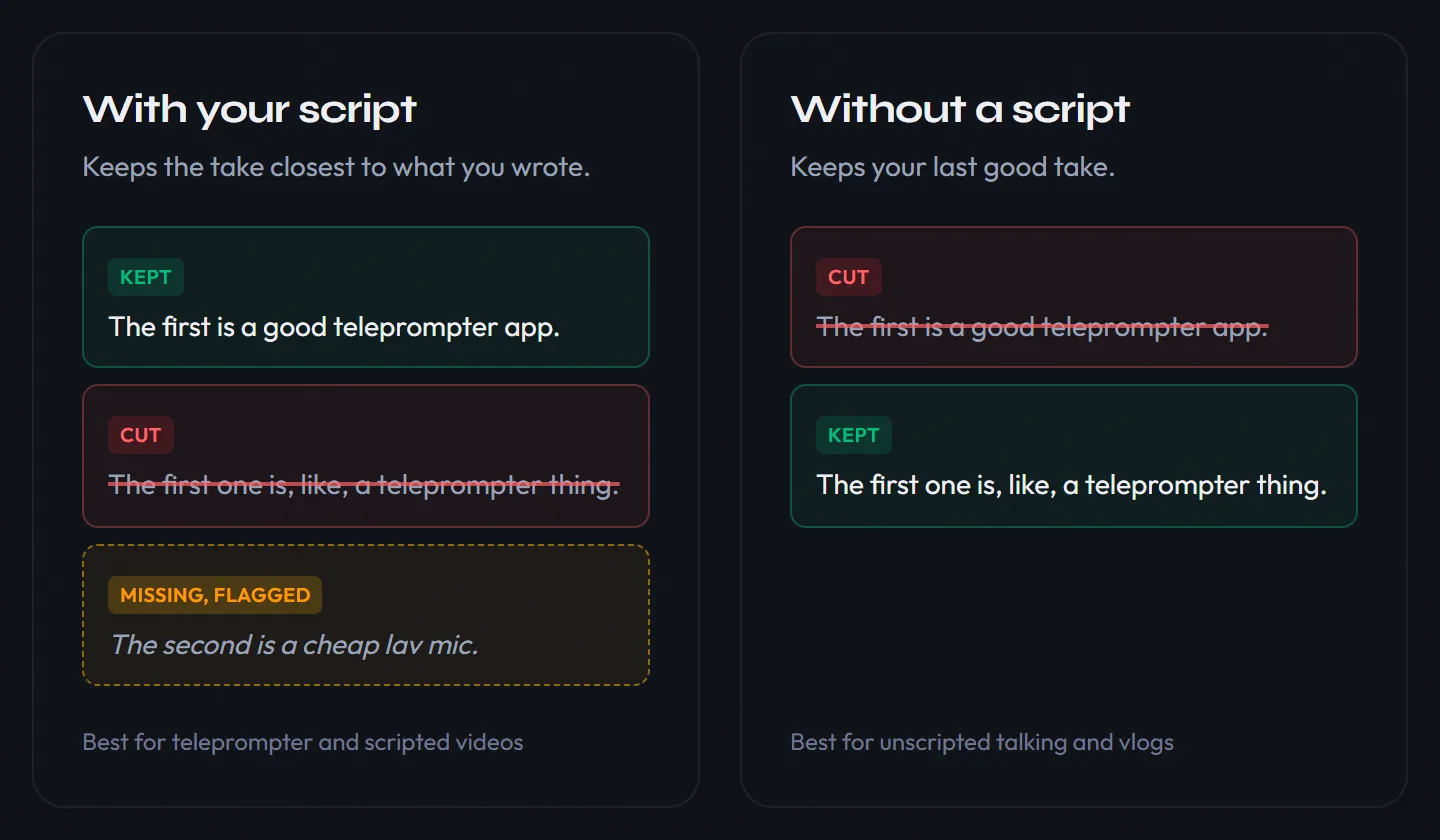
TimeBolt and AI Cut both keep the last good take when you repeat a line. The difference shows up when you paste your script. AI Cut then compares each take with the line you wrote and keeps the closest one, even if a later take drifted. Strict mode also cuts anything you said that isn't in the script, and any line it can't find is flagged.
Each cut is labelled, such as "Repeated take", "Silence" or "Filler words and stutter". Restore any of them, add your own, or edit the video by deleting words from the transcript.
Pros
- Finished video in one place: burned-in subtitles, titles, word highlights and animations, and original, 9:16, 1:1, 4:5 or 16:9 framing with the crop following your face
- Same pass, no add-on: filler words and bad takes come with the cut, with no per-minute fee from us
- Runs in your browser on Cloud, or as a desktop app that processes the video on your computer
- One edit, more outputs: short clips in one click, or a dub into 21 languages
Cons
- On desktop, AI Cut needs your own key from Gemini, OpenAI, OpenRouter, DeepSeek or another OpenAI-compatible service, and that provider bills you for the requests
- No B-roll
How it compares to TimeBolt: TimeBolt gives you more control over the raw cut and more editor exports. AI Cut reads your script, removes fillers without a separate meter, and finishes the video with captions and framing. If your edit ends in Premiere or Resolve anyway, both export XML.
One recording, more videos
After the cut, the same edit becomes more videos, all from one account:
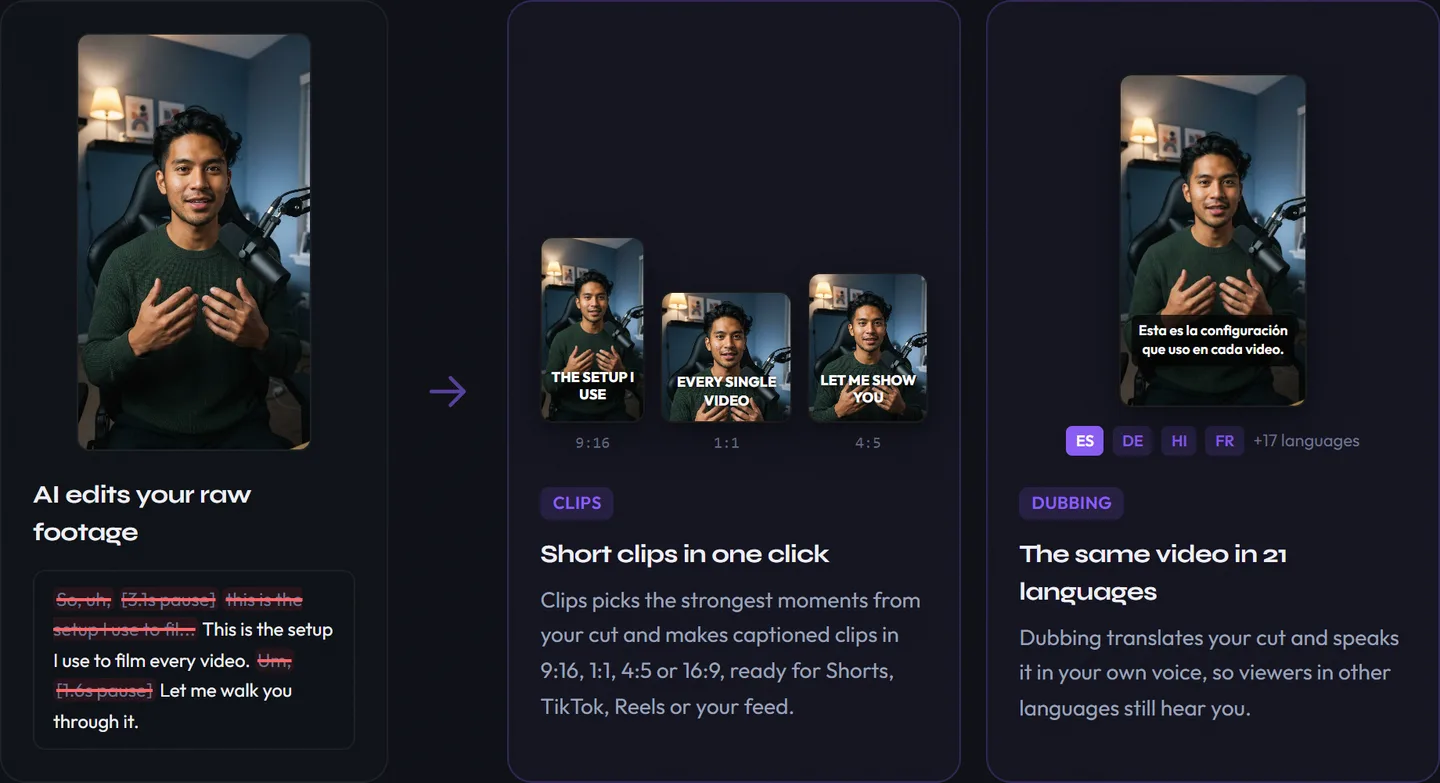
- The full video: cut, captioned and framed, ready for YouTube
- Shorts: Clips picks the strongest moments and turns them into 9:16 clips with subtitles in one click
- Dubbed versions: dub the video into 21 languages. Each speaker's voice is cloned from the video automatically, so you still sound like you, and the background music stays under the new dialogue
Clips and dubbing are both on the free Cloud tier, with watermarked exports.
Try AI Cut free in your browser with a recording you already cut in TimeBolt, and compare the two edits.
Paste your script and see which takes AI Cut keeps
Edit a video freeGling: Best for YouTubers Who Want Extras With the Cut
Gling is an AI editor for YouTubers that removes bad takes, silences and filler words, then adds finishing tools such as AI B-roll, auto zoom framing and title and chapter ideas.
- Best for: YouTubers who want a rough cut plus B-roll and packaging ideas from one subscription
- Price: Free (1 hour a month, watermarked); Plus $20/mo or $10/mo yearly (10 hours); Pro $40/mo or $20/mo yearly (30 hours), checked Oct 2026
- Standout: filler words and bad takes are part of every plan, with no per-minute charge
- Limitation: a monthly hours allowance that doesn't roll over
Pros
- XML for Premiere Pro, Final Cut Pro and DaVinci Resolve on paid plans
- 24 speech languages listed in Gling's pricing FAQ
Cons
- Gling's pages don't say which take it keeps when you repeat a line
- No XML export on the free plan, so you can't test the editor round trip before paying
How it compares to TimeBolt: Gling trades TimeBolt's local processing and lifetime license for a subscription that includes fillers and bad takes. If UMCHECK is most of your TimeBolt bill, Gling's flat price may be simpler. Our Gling alternatives comparison covers its hours cap in detail.
Descript: Best for Doing the Whole Edit by Transcript
Descript is a full video and podcast editor where you cut the media by editing its transcript, with Remove Filler Words and Remove Retakes on every paid plan.
- Best for: creators who want to stop exporting to another editor at all
- Price: Free (1 media hour a month, 720p, watermarked); Hobbyist $24/mo or $16/mo yearly (10 hours); Creator $35/mo or $24/mo yearly (30 hours), checked Oct 2026
- Standout: a complete editor with captions, audio cleanup and the Underlord AI co-editor
- Limitation: AI features draw from a separate pool of AI credits on top of the media hours
Pros
- Runs on the web, Mac and Windows
- Most videos can go from raw recording to export without leaving it
Cons
- Two meters, much like TimeBolt's license plus UMCHECK: media hours and AI credits
- A heavier tool to learn if you only want the cleanup step
How it compares to TimeBolt: TimeBolt cuts and hands off; Descript keeps you inside it for the whole edit. TimeBolt runs a Descript alternative page of its own, so the two often come up together. Pick Descript if you'd rather drop your editor than feed it.
FireCut: Best for Cutting Inside Premiere Pro or DaVinci Resolve
FireCut is a plugin for Premiere Pro and DaVinci Resolve that removes silences, filler words and repeated takes on your existing timeline, with captions, zooms and chapters on its higher plans.
- Best for: editors who live in Premiere or Resolve and want no export and re-import step
- Price: Premiere Starter $19/mo or $10/mo yearly (silence only); Premiere Pro $34/mo or $20/mo yearly (fillers, repetition, captions, zooms, 25 hours each); Resolve Pro $20.99/mo or $16/mo yearly; free Resolve plugin for silence removal; 7-day free trial, checked Oct 2026
- Standout: cuts happen in the project you already have, with captions and zooms in the same panel
- Limitation: it needs Premiere Pro or DaVinci Resolve, and its Resolve features need an internet connection
Pros
- No XML round trip
- A free silence-removal plugin for Resolve
Cons
- Filler and repeat removal start on the Pro plan, and each feature has a monthly hours limit
- No lifetime price listed; it's by request
How it compares to TimeBolt: TimeBolt builds the cut outside your editor and exports it; FireCut cuts on the timeline itself. FireCut's Max plan also lists script-guided editing for Premiere. Choose it over TimeBolt if Premiere or Resolve is already where every video ends.
Recut: Best for Silence-Only Cutting at a Lower One-Time Price
Recut is a Mac and Windows app that removes silence from recordings and exports an XML for your editor.
- Best for: TimeBolt users who only ever used the silence cut
- Price: $129 one-time or $15/mo; free with 3 exports, checked Oct 2026
- Standout: XML for Premiere, DaVinci Resolve, Final Cut Pro, ScreenFlow and CapCut
- Limitation: no filler-word or bad-take detection
Pros
- About a third of TimeBolt's lifetime price
- CapCut and ScreenFlow exports, which TimeBolt doesn't list
Cons
- Repeated lines and false starts stay in
- No captions or SRT export
How it compares to TimeBolt: Recut covers TimeBolt's core silence cut for $218 less as a one-time purchase. If you never bought UMCHECK credits, you may not miss anything.
What a Month of TimeBolt Costs Once You Add UMCHECK
TimeBolt's sticker price covers silence removal. Filler words and bad takes cost $0.03 per minute of video, so the real cost grows with how much you record.
Take a creator who records two 1-hour sessions a week, about 8 hours of raw footage a month:
- UMCHECK: 480 minutes × $0.03 = $14.40 a month, or about $173 a year
- Pro monthly: $17 + $14.40 = $31.40 a month
- Pro yearly: $97 + about $173 = about $270 in year one
- Lifetime: $347 + about $173 = about $520 in year one, then about $173 a year for UMCHECK
TimeBolt's credits never expire, so a quiet month costs nothing extra. And running WhisperX on your own computer drops UMCHECK to $0 a minute, if you're comfortable setting up a local speech model.
Voice Creator Pro charges differently. On Cloud, AI Cut is part of the plan: the free tier includes footage each month, and paid plans start at $5 a month. On the desktop app ($54.99 once), filler and bad-take removal are part of AI Cut, and your AI provider bills you for the requests it makes on the transcript. There's no per-minute fee from us on top.
The math favors TimeBolt if you mostly need silence removal, or if you run WhisperX yourself. It favors a tool with fillers included if UMCHECK is a big share of your bill, or if you're paying separately for a captioning app.
Run one recording through AI Cut and compare it with your TimeBolt cut
Try AI Cut freeSwitching From TimeBolt
Switching works best if you keep TimeBolt until you've tested AI Cut on a few recordings you already know.
- Leave your UMCHECK credits where they are. They never expire, so there's no need to spend them down before you test something else.
- Export the projects you may reopen. Save Premiere, Resolve or Final Cut XML and SRT files while you're on Pro. The free tier can't export XML or save projects.
- Check the refund window. TimeBolt offers a 30-day money-back guarantee through refund@timebolt.io. Monthly and yearly plans cancel from your account at timebolt.io/access.
- Upload a recording to AI Cut on the free Cloud tier and paste the script if you read from one.
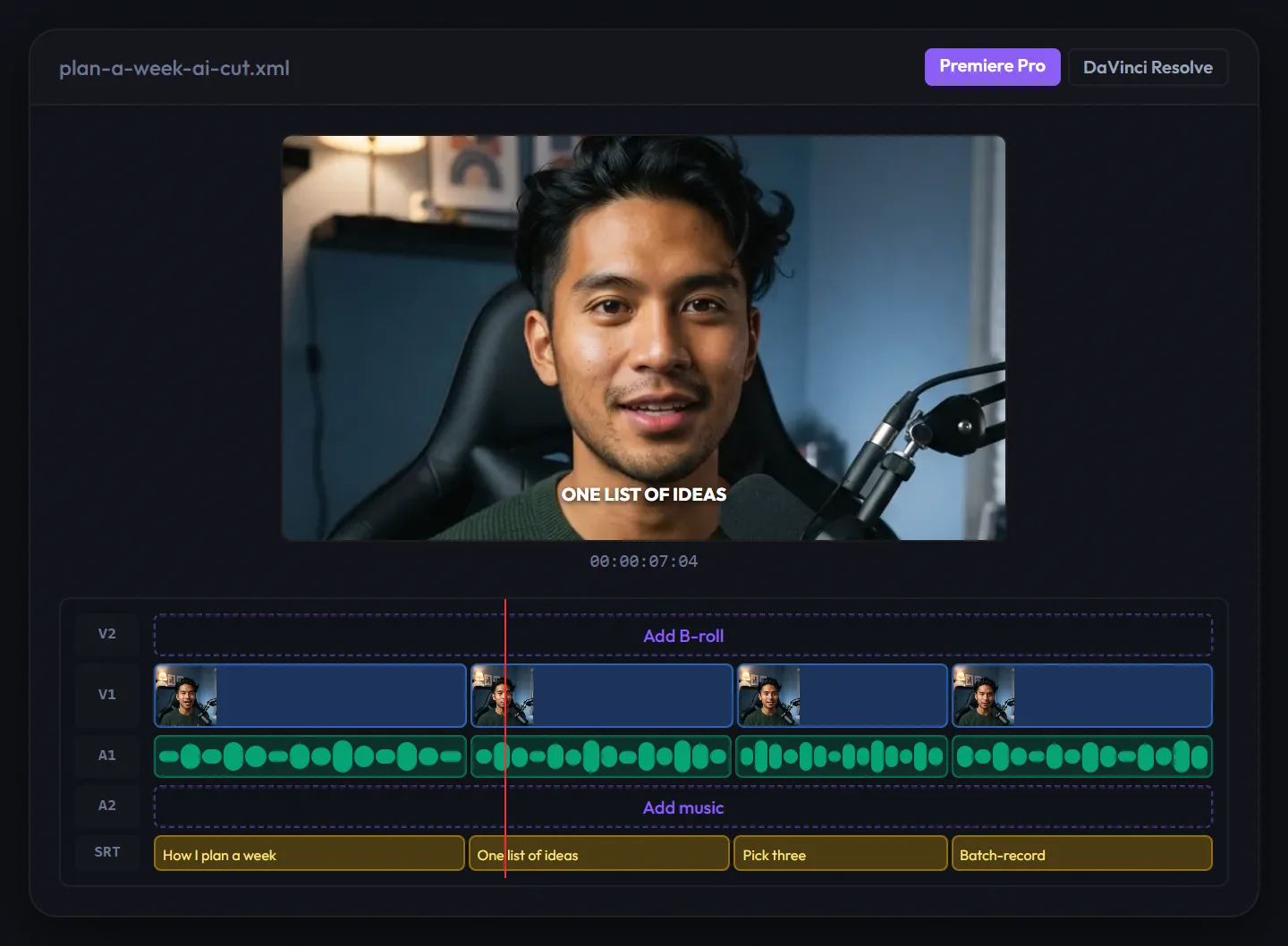
- Review the labelled cuts, then export the video with subtitles, an SRT, or a Premiere Pro or DaVinci Resolve XML. If you finish in Final Cut or Camtasia, keep TimeBolt or Recut for that handoff.
How to Choose
- Pick TimeBolt if you want the video to stay on your machine, you finish in Final Cut or Camtasia, or you mostly need silence removal.
- Pick Voice Creator Pro AI Cut if you record from a script, want captions and 9:16 framing without another editor, or want clips and dubs from the same edit.
- Pick Gling if you want B-roll and title ideas alongside a flat monthly price for fillers.
- Pick Descript if you're ready to move your whole edit into one transcript-based tool.
- Pick FireCut if every video ends in Premiere Pro or DaVinci Resolve and you want the cuts on that timeline.
- Pick Recut if dead air is the only thing you cut and $129 once sounds better than $347.
Adding word-by-word captions after the cut? See our guide to word-by-word animated captions. Cutting a long recording into Shorts? Read how to turn long videos into short clips.
Try AI Cut for free
Also available on Windows and macOS. One-time purchase, unlimited generations.