
How to Add Pauses and Control Pacing in Text to Speech
One of the most common problems with AI-generated speech is that it sounds rushed. Sentences blur together, there's no breathing room, and the result feels robotic. Its generally not because the voice itself is bad, but because the pacing is wrong.
Good pacing is what separates a flat reading from a compelling one. A well-placed pause can add weight to a phrase, give the listener time to absorb an idea, or build anticipation before a key moment.
The good news is that you can control pacing directly through how you format your input text. The simplest way is to use em dashes (––) to add pauses exactly where you want them.
Hear the Difference
Before diving into the technique, listen to these two clips. Both use the same voice and the same text. The only difference is the formatting of the input.
Without em dashes: the text was entered as a plain paragraph with no pacing cues:
There is a land that never forgets. A land where time does not flow, but is stratified: stone upon stone. For millennia, the river has flowed like the lifeblood of a civilization that has defied eternity. Welcome to Egypt.
With em dashes: the same text, but with –– pauses added:
There is a land –– that never forgets.
A land –– where time does not flow, but is stratified: stone –– upon stone.
For millennia, the river has flowed –– like the lifeblood of a civilization that has defied eternity.
Welcome –– to Egypt.
Notice how the second version feels more intentional. The pauses give the listener time to absorb each phrase and create a sense of drama. That difference comes entirely from how the input text is formatted.
The em dash Technique
To make the voice pause or slow down at a specific point, insert two em dashes (––) where you want the break. The model treats this as a signal to briefly hold before continuing.
Here's a simple example:
The door opened –– and everything changed.
Compare that to the version without the pause:
The door opened and everything changed.
The first version gives "and everything changed" more impact. The pause creates a beat of suspense: the listener waits, then receives the payoff.
Tip: The pause created by –– is subtle, roughly the length of a natural breath. It won't create a full stop or an awkward silence.
Putting It All Together
Here's a full example with multiple em dashes throughout. This is the exact input used to generate the audio sample above with em dashes:
There is a land –– that never forgets.
A land –– where time does not flow, but is stratified: stone –– upon stone.
For millennia, the river has flowed –– like the lifeblood of a civilization that has defied eternity.
Welcome –– to Egypt.
Notice the pattern:
- em dashes appear before key phrases: "that never forgets", "where time does not flow", "upon stone", "like the lifeblood", "to Egypt". This gives each phrase a moment of anticipation.
- The final sentence is short and punchy: after the long, flowing sentences, "Welcome –– to Egypt" lands with weight.
Quick Tips for Better Pacing
-
Read your text aloud first. Wherever you naturally pause or slow down, add two em dashes.
-
Don't overdo it. A pause on every other word loses its effect. Use pauses where they matter: before reveals, after important statements, or at emotional turns.
-
Short sentences after long ones create punch. A flowing, descriptive sentence followed by a short declarative one is one of the most effective patterns for narration.
-
Match pacing to the mood. A fast-paced action scene needs fewer pauses. A contemplative monologue benefits from more of them.
-
Experiment and iterate. Generate, listen, adjust. Move an em dash a few words earlier or later and hear how it changes the delivery.
Exact Pauses for Audiobooks and Long-Form Content
em dashes are the fastest way to shape pacing when you are generating a line or two. But when you are producing a full audiobook, a long narration, or a podcast script, you often want pauses that are precise and repeatable rather than approximate. For that, Voice Creator Pro's Audiobooks tab lets you set pauses in exact milliseconds.
There are two ways to do it: set a pause at a specific point in the text, or set the default gaps between paragraphs and segments across the whole audiobook.
Set a Pause at a Specific Point
Inside an audiobook you can add a pause of an exact length before any word or phrase:
- Open the Audiobooks tab and add your text by uploading a file (EPUB, PDF, DOCX, or TXT) or pasting it directly.
- Click into a segment to select it.
- Highlight the word or phrase before which you want the pause.
- A Selection panel appears on the right side.
- In that panel, set the Pause value to the length you want, in milliseconds.
The pause is inserted right before the highlighted text, so you get the exact beat you want every time you generate.
Set the Default Gaps Across a Whole Audiobook
For consistent pacing across a long document, you can control the silence inserted between every paragraph and every segment, so you do not have to place pauses one by one:
- Click the gear icon in the Audiobooks tab to open its settings.
- Under the Output section, adjust:
- Paragraph gap (ms): the silence between paragraphs (default 300 ms).
- Segment gap (ms): the silence between segments (default 1000 ms).
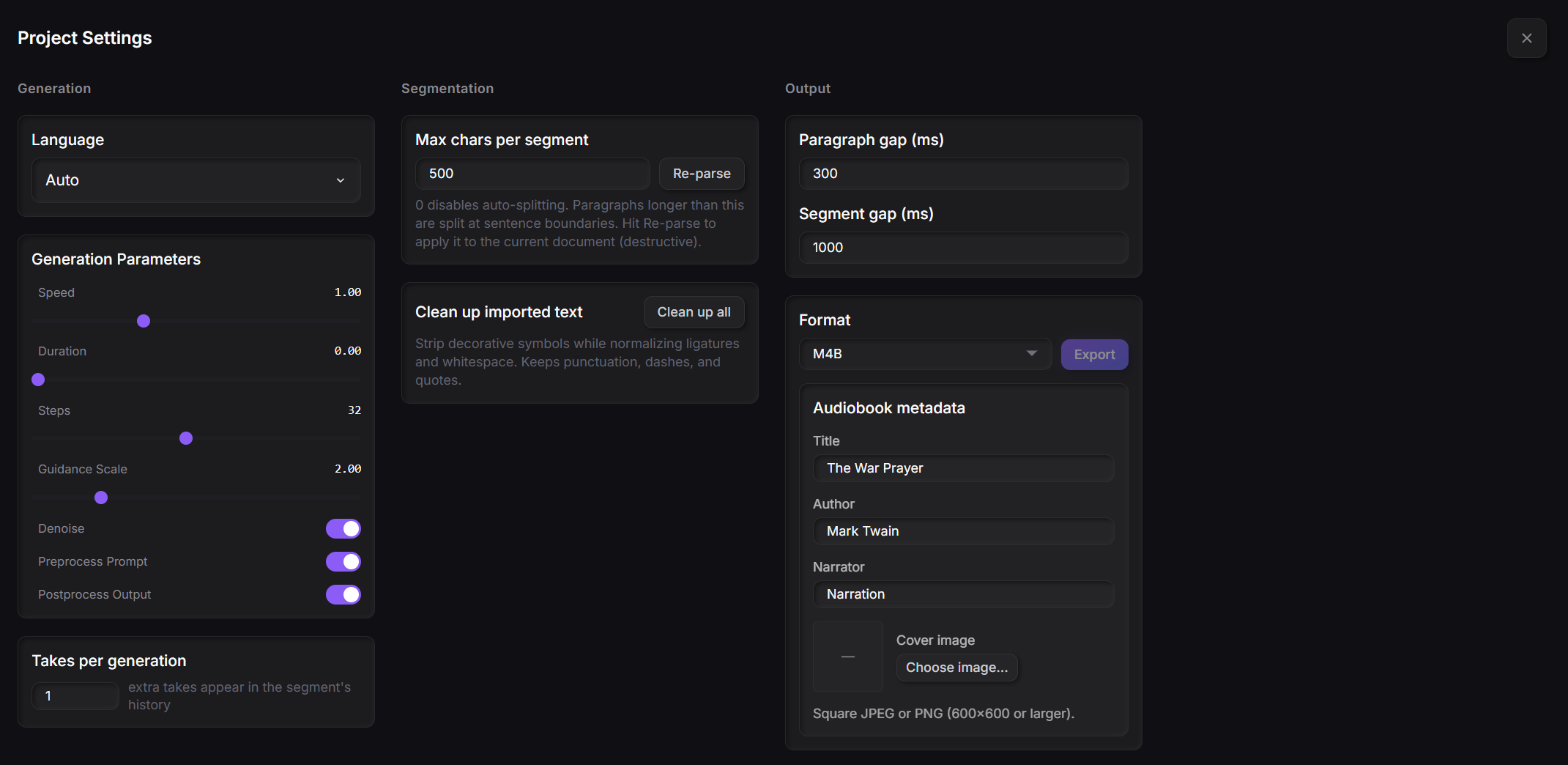
These gaps apply to the entire audiobook. Shorter gaps create a brisker pace, while longer ones give listeners more room to absorb each section. Fiction often reads well with slightly longer paragraph gaps (around 400 to 500 ms), while non-fiction can use shorter gaps for a faster pace.
You can combine all of these methods. Use em dashes for dramatic beats inside a sentence, selection-level pauses for exact timing at key moments, and the paragraph and segment gaps to set the overall rhythm of the finished audiobook. For a full walkthrough, see the guide on how to generate an audiobook.
Pacing is only half of an expressive read. On the Qwen3 TTS model you can also assign an emotion to a selection or a whole segment the same way you set a pause, so a chapter can shift from calm to dramatic to tender as it goes. See how to add emotion to text to speech for the full method.
Try Voice Creator Pro for free
Also available on Windows and macOS. One-time purchase, unlimited generations.